
Free Resume/CV Templates Download in Word, Google Docs, PDF
Today is a great day to level up your resume. Free resume templates in every style, format, and design you can imagine.
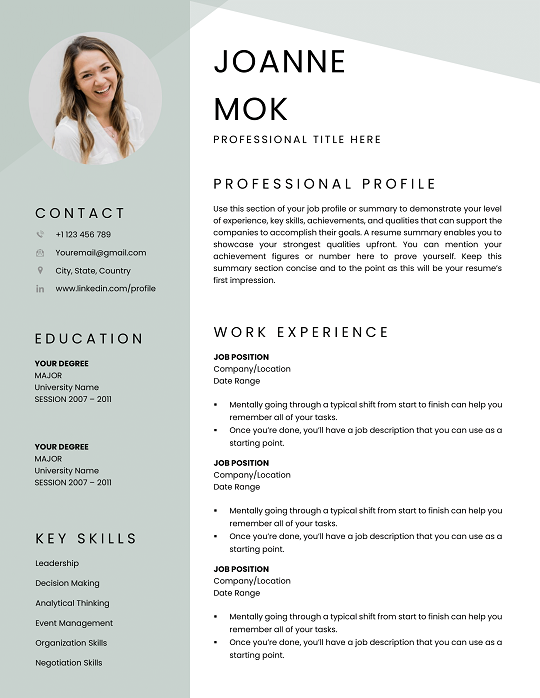
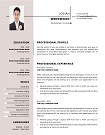
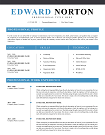
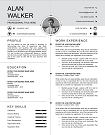
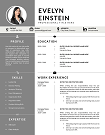
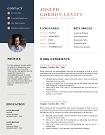
Two-Page Resume Template | Professional and Editable Designs
Stand out with our Two Page Resume Templates—perfect for professionals with extensive experience. Designed for clarity, ATS compatibility, and easy customization in Word, these templates showcase your skills without compromise. Download now to make a lasting impression!
File size: 322 KB
Format: MS Word
Downloaded 14,624 times
License: Free, personal use only.
Download
Easily Access Your Resume Templates Today
Our CV Templates are designed for simplicity and effectiveness. Follow the steps below to customize and download your perfect resume.
Step-by-step Guide to Downloading
Choose a template that suits your style.
Customized Your Resume to Stand Out
Edit the template with MS word
Download and Prepare for Applications
Save Your customized CV as a PDF.
Resume Examples by Profession
Download our free professional resume examples. All of our examples have been designed and created by our career experts. Choose your professional profile and create your free resume in Microsoft Word now!
Unlock Your Career Potential with ATS-Friendly Resume Templates
Our Free Resume Templates are designed to be ATS-friendly, ensuring your application gets noticed by employers. Stand out in a competitive job market with professional designs that highlight your skills and experience.

Two-Page Resume Templates: Your Path to a Powerful, Professional Impression
Are you a senior professional looking for more space to showcase your skills, experience, and achievements? Or are you aiming to switch careers and need to tell a fuller story on your resume? Our Two-Page Resume Templates offer the ideal canvas. They’re designed with hiring managers, recruiters, and applicant tracking systems (ATS) in mind—so you can shine without sacrificing clarity or design.
Why Use Two-Page Resume Templates?
Sometimes, one page just isn’t enough. If you’ve been in the workforce for over 10 years, held leadership roles, or accumulated multiple certifications, switching to a two-page format makes sense. Here’s what you gain:
- More space to highlight accomplishments. You can dive deeper into achievements, project leadership, and results.
- Better structure without clutter. Organize sections so each page breathes—avoid dense blocks that frustrate hiring managers.
- ATS-friendliness. Our layouts follow ATS guidelines so your resume content gets parsed properly. (For best practices, see SHRM’s ATS advice on resume formatting SHRM.org and Jobscan’s blog on Applicant Tracking Systems Jobscan.co Blog.)
- Use the extra page for leadership experiences, speaking engagements, publications—or simply to include more skills and certifications.
Features of Our Two-Page Resume Templates
Each template is crafted with features to help you stand out in today’s competitive job market:
- Clean, modern design: Minimalist graphics, professional typography, and clear headings that guide the reader’s eye.
- Pre-formatted sections: Experience, Education, Certifications, Projects, Skills—all structured for maximum impact.
- ATS-compliant formatting: No fancy columns or text boxes that confuse parsing software.
- Easy customization: Fully editable in Word, Google Docs, and InDesign. Choose your font, color scheme, and layout alignment.
- Multiple layout options: Chronological, functional, hybrid/timeline styles to match different career paths.
Who Should Use a Two-Page Resume Template?
If you fall into one or more of these categories, these templates are especially for you:
- Seasoned professionals and executives with 10+ years of work history and leadership roles.
- Academics, researchers, or consultants who need to list publications, speaking engagements, or project portfolios.
- Career changers who want to include relevant transferable skills, certifications, or training.
- Technical experts in areas like engineering, IT, or finance with many certifications or technical proficiencies.
- International job seekers needing CVs/resumes that comply with global standards (see Europass CV guidelines Europa.eu).
Use Cases & Industries Served
Here are real-world scenarios where a two-page resume template makes a difference:
- Healthcare & Medical Leadership: Directors of nursing, hospital administrators—lots of certifications + patient safety metrics to show.
- Education & Research: Professors, Post-docs, Researchers with publications, grants, courses taught.
- Technology & Engineering: Software architects, systems engineers with long project history, many tools & languages.
- Business Management & Operations: CXOs, product managers, operations leads with strategic initiatives and team leadership.
- Creative Industries: Designers, creative directors, project portfolios, speaking engagements, exhibitions.
How to Customize Your Two-Page Resume Template
Customizing properly turns a template into your personal brand. Here’s how:
- Adjust section order: If your certifications are stronger than job history, bring them up; or if leadership & projects are critical, lead with those.
- Use strong, quantified achievements: “Increased sales by 40%” sounds better than “helped increase sales.” For advice on writing achievement-oriented bullet points, see Harvard Business Review’s guidance on compelling accomplishments HBR.org.
- Pick the right design elements: Color, font-size, white space—all contribute to readability and professionalism.
- Ensure mobile & PDF readability: Many hiring managers view resumes on tablets or phones; exporting to PDF preserves format.
- Tailor per job application: Highlight keywords from the job description without stuffing. See The Muse’s keyword strategy for resumes TheMuse.com.
Why Our Two-Page Resume Templates Stand Out
We believe in delivering results. Here’s what sets (CVTemplatesHub.com) templates apart:
- Proven success stories: Over 1,500 senior-level clients landed interviews within two weeks of using our resume templates.
- Expert designers & career coaches: Created by professionals with real HR experience and resume writing mastery.
- Secure, instant download: All templates come with robust file security and multiple format options—Word, Google Docs, InDesign.
Download Your Free Cover Letter!
Transform you job application with our professional, cover letter templates designed for 2025.
Blog
Resume Building Insights
Explore expert tips for crafting your perfect resume.

Discover essential, editable Word resume examples. Easy to edit, free to download — create your perfect resume in minutes. Start building now!

Learn how to write a resume with proven steps. Follow this easy guide and create a job-winning resume that gets you hired faster today!

Use our free online CV maker to create a professional resume in minutes. No design skills needed. Start now and land your dream job faster.

Learn which skills in a CV grab attention. Use our proven list to impress recruiters, pass ATS scans, and get hired faster. Start building now!

Wondering if your CV should be 1 or 2 pages? Discover the proven answer with expert tips. Learn what works best—start optimizing your CV now!

Discover essential resume/CV tips that help you stand out. Use these proven strategies to land interviews—start improving your resume today!
FAQs
What is a two-page resume template and when should I use it?
- A two-page resume template is a format that allows you two full pages to present your professional background. Use it when you have extensive experience (usually 7–10+ years), leadership roles, multiple projects, or certifications that won’t fit naturally on one page. The goal is to maintain clarity rather than stuffing.
Does using two pages hurt my chances with recruiters?
- Not if done right. Recruiters expect two-page resumes from experienced candidates. What matters most is relevance, readability, and maintaining an ATS-friendly structure. Use clear headings, bullet points, and avoid huge blocks of text.
How do I make sure a two-page resume template is ATS compatible?
- Choose templates that avoid complex tables or graphics that ATS may misread. Use standard fonts, logical section headings (e.g., Education, Experience), and ensure your primary keywords (skills, job title) appear naturally. Refer to resources like the SHRM guidelines on resume formatting SHRM.org and Jobscan’s ATS guides Jobscan.co Blog.
Can I convert a one-page resume into two pages without weakening its impact?
- Yes. Expand where you have strong impact—projects, leadership, technical skills—but remove or consolidate weaker or older experience. Highlight what’s most relevant to the role. Keep formatting consistent, and make sure page two still feels cohesive. Your experience after switching shouldn’t look forced or padded.
Is a two-page resume acceptable for international job applications?
- Often yes—but check cultural expectations. In Europe, the Europass format is widely recognized Europa.eu. In some countries, employers prefer concise resumes. Always research norms of your target job market.
How to Customize a Resume Template in MS Word?
Follow these steps to easily customize and use your CV template in Microsoft Word.
Download the Resume Template?
Click the download button on the CV Templates Hub website and save the .docx file to your computer.
Open the Template
Open the downloaded template in Microsoft Word or any compatible word processor.
Edit Personal Information
Replace placeholder information like name, contact details, and work experience with your own data.
Save and Export
Save the final version of your CV and export as PDF if required for online applications.