
Free Resume/CV Templates Download in Word, Google Docs, PDF
Today is a great day to level up your resume. Free resume templates in every style, format, and design you can imagine.

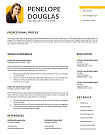
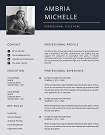
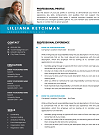
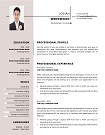
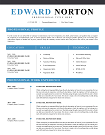
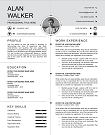
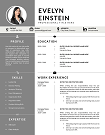
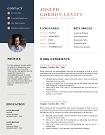
Best Two-Column CV Template for Designers Free Download
Stand out with our Two-Column CV Templates—professionally designed to showcase your skills and experience side by side for maximum impact. Perfect for all industries, these ATS-friendly layouts improve readability and help recruiters find key info faster. Download in multiple formats and start impressing today!
File size: 73 KB
Format: MS Word
Downloaded 42,179 times
License: Free, personal use only.
Download
Easily Access Your CV Templates Today
Our CV Templates are designed for simplicity and effectiveness. Follow the steps below to customize and download your perfect resume.
Step-by-step Guide to Downloading
Choose a template that suits your style.
Customized Your CV to Stand Out
Edit the template with MS word
Download and Prepare for Applications
Save Your customized CV as a PDF.
Resume Examples by Profession
Download our free professional resume examples. All of our examples have been designed and created by our career experts. Choose your professional profile and create your free resume in Microsoft Word now!
Unlock Your Career Potential with ATS-Friendly CV Templates
Our Free CV Templates are designed to be ATS-friendly, ensuring your application gets noticed by employers. Stand out in a competitive job market with professional designs that highlight your skills and experience.

Two-Column CV Templates – Modern, Clean, and Professional
Looking for a CV layout that’s both stylish and recruiter-friendly? Our Two-Column CV Templates are designed to make your profile stand out while keeping the information structured and easy to scan. Whether you’re applying for a corporate role, a creative position, or a technical job, these templates balance design and functionality perfectly.
Why Choose a Two-Column CV Template?
A two-column layout allows you to organize your details in a visually appealing and space-efficient way. Instead of cramming everything into one column or creating a cluttered design, our templates give you balance. Here’s why job seekers love them:
- Enhanced readability – Quick scanning for recruiters.
- Stylish yet professional – A modern design that suits multiple industries.
- ATS-friendly structure – Passes Applicant Tracking Systems without errors (ATS guidelines).
- Optimized space – Fit more information without extending to three pages.
Who Should Use Two-Column CV Templates?
This layout is ideal for candidates who want to highlight both personal branding and professional experience. Here’s who benefits the most:
- Mid-level professionals looking to showcase skills alongside experience.
- Creative professionals (designers, marketers) who want a visually appealing layout.
- Tech experts needing space for projects, tools, and certifications.
- Career changers wanting to emphasize transferable skills.
Key Features of Our Two-Column CV Templates
- Fully editable in Word & Google Docs – Customize in minutes.
- Modern & professional designs – Clean lines and easy navigation.
- ATS-compatible layouts – Avoid fancy graphics that block ATS scanning.
- Instant download – Start editing right away.
- Guided examples – Built-in writing tips for each section.
When Should You Use a Two-Column CV?
A two-column format works best when you want to balance multiple sections without overwhelming the reader. For example, if you want your skills and contact info on the left and your experience and education on the right, this format is perfect.
According to Harvard Business Review, resumes with clear visual hierarchy help hiring managers identify key details quickly—making a two-column design an excellent choice.
Customization Options
Every job seeker is unique. That’s why our templates include:
- Customizable colors & fonts – Match your personal branding.
- Flexible sections – Add or remove skills, certifications, and achievements.
- Compatible with ATS – Tested to ensure compliance with most job portals (Jobscan’s resume formatting tips).
Industries Where Two-Column CVs Shine
- Marketing & Creative roles – Showcase creativity and design sense.
- Information Technology – Highlight technical skills and certifications separately.
- Finance & Consulting – Present structured and professional layouts.
- Healthcare & Education – Balance detailed roles with easy navigation.
Expert Tips for Using a Two-Column CV Template
- Keep left column short – Contact info, skills, and personal details.
- Prioritize experience – Right column should carry the main content.
- Use keywords naturally – Match job descriptions (keyword optimization guide).
- Avoid heavy graphics – Too many visuals can confuse ATS scanners.
- Save as PDF (with text layers) – So recruiters can parse your CV easily.
Why Choose CV Templates Hub?
Thousands of professionals trust us for their resume needs. Here’s why:
- Modern, ATS-compliant templates built by resume experts.
- Secure downloads with no hidden costs.
- Dedicated support for all customers.
Download Your Free Cover Letter!
Transform you job application with our professional, cover letter templates designed for 2025.
Blog
Resume Building Insights
Explore expert tips for crafting your perfect resume.

Discover essential, editable Word resume examples. Easy to edit, free to download — create your perfect resume in minutes. Start building now!

Learn how to write a resume with proven steps. Follow this easy guide and create a job-winning resume that gets you hired faster today!

Use our free online CV maker to create a professional resume in minutes. No design skills needed. Start now and land your dream job faster.

Learn which skills in a CV grab attention. Use our proven list to impress recruiters, pass ATS scans, and get hired faster. Start building now!

Wondering if your CV should be 1 or 2 pages? Discover the proven answer with expert tips. Learn what works best—start optimizing your CV now!

Discover essential resume/CV tips that help you stand out. Use these proven strategies to land interviews—start improving your resume today!
FAQs
Are two-column CV templates ATS-friendly?
Yes! Our templates follow Europass CV standards and pass ATS scans when formatted correctly.
What’s the main advantage of a two-column CV?
Better visual hierarchy—skills and experience are easy to scan quickly.
Can I use these templates in Word and Google Docs?
Yes. All templates are fully compatible with Microsoft Word and Google Docs.
Are these templates suitable for creative roles?
Yes, especially for marketing, design, and tech fields where layout matters.
Do two-column CVs work for all countries?
Yes, but always check the local standards. For Europe, see Europass guidelines.
How to Customize a CV Template in MS Word?
Follow these steps to easily customize and use your CV template in Microsoft Word.
Download the CV Template?
Click the download button on the CV Templates Hub website and save the .docx file to your computer.
Open the Template
Open the downloaded template in Microsoft Word or any compatible word processor.
Edit Personal Information
Replace placeholder information like name, contact details, and work experience with your own data.
Save and Export
Save the final version of your CV and export as PDF if required for online applications.