Free Resume/CV Templates Download in Word, Google Docs, PDF
Today is a great day to level up your resume. Free resume templates in every style, format, and design you can imagine.
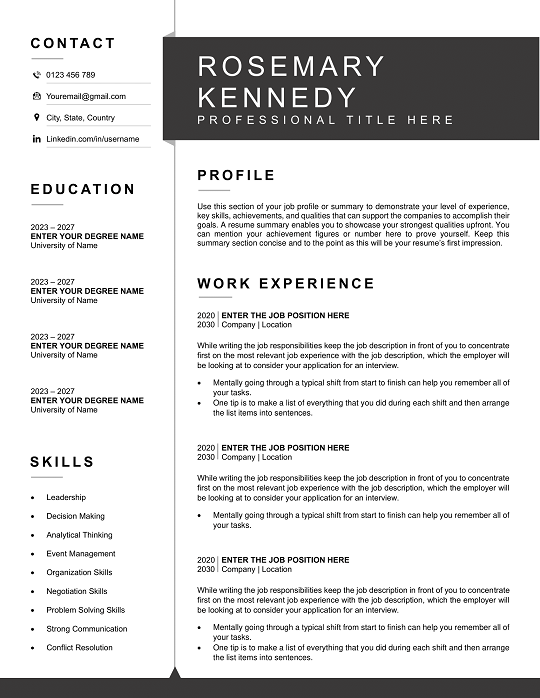
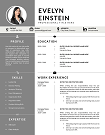
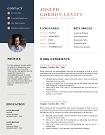
Free International Resume Template | Editable & Pro
Expand your global career with our International Resume Templates—designed to meet global hiring standards and formatting expectations. ATS-friendly and editable in all formats, these templates help you make a strong impression across borders. Perfect for job seekers targeting international roles.
File size: 135 KB
Format: MS Word
Downloaded 18,773 times
License: Free, personal use only.
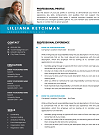
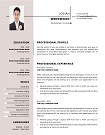
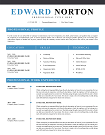
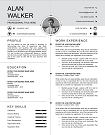
Download
Easily Access Your Resume Templates Today
Our CV Templates are designed for simplicity and effectiveness. Follow the steps below to customize and download your perfect resume.
Step-by-step Guide to Downloading
Choose a template that suits your style.
Customized Your Resume to Stand Out
Edit the template with MS word
Download and Prepare for Applications
Save Your customized CV as a PDF.
Resume Examples by Profession
Download our free professional resume examples. All of our examples have been designed and created by our career experts. Choose your professional profile and create your free resume in Microsoft Word now!
Unlock Your Career Potential with ATS-Friendly Resume Templates
Our Free Resume Templates are designed to be ATS-friendly, ensuring your application gets noticed by employers. Stand out in a competitive job market with professional designs that highlight your skills and experience.

International Resume Templates – Professional, Customizable & ATS-Friendly
Looking to land your dream job abroad? Our International Resume Templates are designed to meet global hiring standards, making it easier for job seekers to stand out across countries and industries. Whether you’re applying in Europe, Asia, the Middle East, or North America, these templates follow the latest trends and applicant tracking system (ATS) guidelines to ensure your resume passes initial screenings.
Why Choose Our International Resume Templates?
- Globally Optimized: Compliant with major international resume formats including Europass and North American standards.
- ATS-Friendly: Tested against leading applicant tracking systems to ensure compatibility (see ATS guidelines).
- Fully Customizable: Edit easily in Microsoft Word or Google Docs—tailor fonts, sections, and layouts.
- Professional Design: Clean layouts that highlight your skills and achievements for global recruiters.
- Download Instantly: Secure downloads with clear licensing policies—your data is always protected.
Who Are International Resume Templates For?
Our International Resume Templates are perfect for:
- Professionals seeking opportunities in global markets.
- Graduates applying to universities or internships abroad.
- Remote workers and freelancers targeting international clients.
- Executives relocating for overseas leadership roles.
For instance, a marketing specialist in Pakistan applying for a role in Germany can use our templates formatted for Europass CV standards to meet European expectations seamlessly.
Industries & Use Cases
Our templates serve a wide range of industries, including:
- IT & Software Development
- Healthcare & Nursing
- Engineering & Architecture
- Business Management & Finance
- Creative & Design Roles
Key Features of Our Templates
- Multi-Language Support: Easily adapt your resume for English, French, or other languages.
- Keyword Optimization: Integrated tips to help you include job-specific keywords (see keyword advice here).
- Achievement-Based Sections: Structured to showcase measurable results (achievement writing tips).
- Modern Yet Traditional: Balances visual appeal with conservative formats preferred in certain countries.
How to Customize Your International Resume Template
- Download your preferred template.
- Edit in Microsoft Word or Google Docs with your personal details.
- Adjust sections like Skills, Experience, and Education for each job market.
- Save as PDF to maintain layout consistency across devices.
Trusted by Thousands of Job Seekers Worldwide
Our templates have helped thousands of professionals secure roles in Fortune 500 companies and international organizations. We’re proud to offer secure downloads and transparent policies. See our Good Resume Templates for even more options.
Download Your Free Cover Letter!
Transform you job application with our professional, cover letter templates designed for 2025.
Blog
Resume Building Insights
Explore expert tips for crafting your perfect resume.
Discover essential, editable Word resume examples. Easy to edit, free to download — create your perfect resume in minutes. Start building now!

Learn how to write a resume with proven steps. Follow this easy guide and create a job-winning resume that gets you hired faster today!

Use our free online CV maker to create a professional resume in minutes. No design skills needed. Start now and land your dream job faster.

Learn which skills in a CV grab attention. Use our proven list to impress recruiters, pass ATS scans, and get hired faster. Start building now!

Wondering if your CV should be 1 or 2 pages? Discover the proven answer with expert tips. Learn what works best—start optimizing your CV now!

Discover essential resume/CV tips that help you stand out. Use these proven strategies to land interviews—start improving your resume today!
FAQs
What makes an International Resume Template different from a standard resume?
International templates are formatted to meet global standards, including section order, language preferences, and ATS compatibility.
Are these templates compatible with applicant tracking systems?
Yes. All templates are tested for ATS-friendliness, following Jobscan’s ATS best practices.
Can I use the same template for different countries?
Absolutely. Just tweak language, spelling (e.g., “resume” vs. “CV”), and key sections to fit local norms.
How do I ensure my resume includes the right keywords?
Use our integrated keyword tips and cross-check with resources like The Muse’s keyword guide to optimize for ATS.
Are the downloads secure?
Yes. All downloads are encrypted, and we never store your personal data beyond the transaction.
How to Customize a Resume Template in MS Word?
Follow these steps to easily customize and use your CV template in Microsoft Word.
Download the Resume Template?
Click the download button on the CV Templates Hub website and save the .docx file to your computer.
Open the Template
Open the downloaded template in Microsoft Word or any compatible word processor.
Edit Personal Information
Replace placeholder information like name, contact details, and work experience with your own data.
Save and Export
Save the final version of your CV and export as PDF if required for online applications.